内部资源站
简介
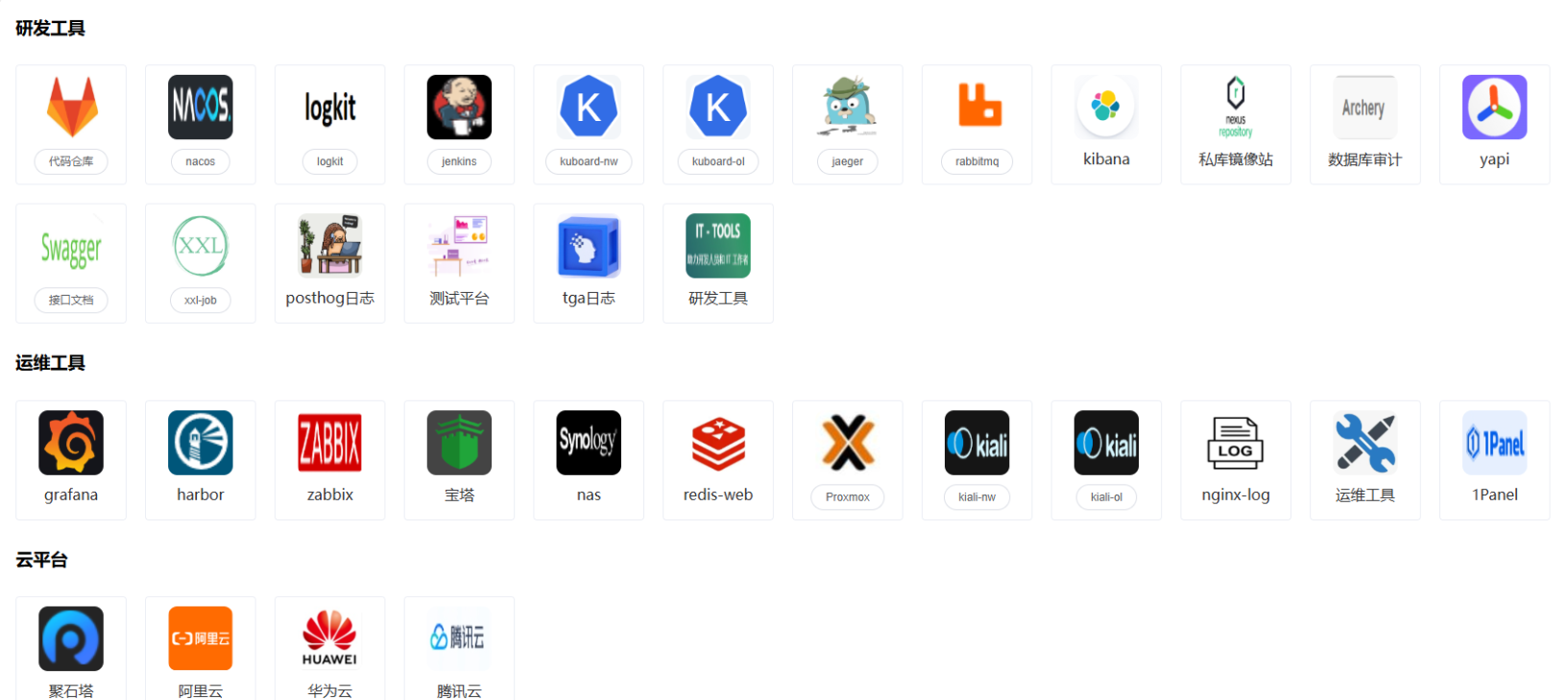
一个简单的资源管理站点, 使用python的flask工具开发, 引用Element样式, 方便管理和快速查找公司各种工具。
部署
目录结果
./
│   data-v2.json    # 配置文件
│   main.py         # python主函数
│   README.md
│
├───static
│   │   favicon.ico
│   │   index.css   # Element ui
│   │   index.js
│   │   vue.js
│   │
│   └───img
│           1panel.png  # 展示的图片
│           aliyun.png
│           archery.png
│           arweb.png
│           baota.png
│           cdn.png
│
└───templates
        index.html      # 页面代码
python代码
from flask import Flask, render_template, jsonify
import json

app = Flask(__name__)

# 修改 Jinja2 默认语法
app.jinja_env.variable_start_string = '[['
app.jinja_env.variable_end_string = ']]'

# 读取并返回 data.json 文件内容
@app.route('/data')
def get_data():
    try:
        with open('data-v2.json', 'r', encoding='utf-8') as file:
            data = json.load(file)
        return jsonify(data)  # 返回 JSON 格式的数据
    except FileNotFoundError:
        return jsonify({"error": "File not found"}), 404
    except json.JSONDecodeError:
        return jsonify({"error": "Error decoding JSON"}), 500

# 渲染 index.html 页面并传递数据
@app.route('/')
def index():
    return render_template('index.html')

if __name__ == '__main__':
    app.run(host="0.0.0.0", port=8080)
html代码
<!DOCTYPE html>
<html lang="en">

<head>
    <meta charset="UTF-8">
    <meta name="viewport" content="width=device-width, initial-scale=1.0">
    <title>内部资源站</title>
     <link rel="icon" rel="stylesheet" href="static/favicon.ico">
    <!-- 引入 Element UI 的 CSS -->
    <link rel="stylesheet" href="static/index.css">
    <script src="static/vue.js"></script>
    <script src="static/index.js"></script>
</head>

<body>

    <div id="app">
        <div class="list" v-for="(item, itemindex) in database" :key="itemindex">
            <h3 style="padding-left: 10px;">{{ item.indexname }}</h3>
            <div class="table">
                <el-card class="card" shadow="hover" v-for="app in item.appgroup" :key="app.message">
                    <template v-if="app.lables">
                        <img v-bind:src="app.img" class="image">
                        <el-popover placement="right" trigger="click">
                            <el-table :data="app.env" max-height="450">
                                <el-table-column prop="urlname" label="环境">
                                    <template slot-scope="scope">
                                        <el-link :href="scope.row && scope.row.url" target="_blank">
                                            {{ scope.row.urlname }}
                                        </el-link>
                                    </template>

                                </el-table-column>
                            </el-table>
                            <el-button round slot="reference" size="mini">{{ app.urlname }}</el-button>
                        </el-popover>
                    </template>
                    <template v-else>
                        <img v-bind:src="app.img" class="image" v-on:click="urljump(app.url)">
                        <div align="center"><span>{{ app.urlname }}</span></div>
                    </template>
                </el-card>
            </div>

        </div>
    </div>

    <!-- 自定义的 JavaScript -->
    <script>
        new Vue({
            el: '#app',
            data() {
                return {
                    database: []
                };
            },
            created() {
                fetch('/data')
                    .then(response => response.json())
                    .then(data => {
                        this.database = data;
                    })
                    .catch(error => console.error('Error fetching data:', error));
            },
            methods: {
                urljump(url) {
                    window.open(url)
                }
            }
        });
    </script>

    <style>
        .table {
            display: flex;
            flex-wrap: wrap;
        }


        .card {
            margin: 10px;
            box-sizing: border-box;
            width: 120px;
        }

        .el-card__body {
            display: flex;
            justify-content: center;
            align-items: center;
            flex-direction: column;
            padding: 10px !important;
        }

        .image {
            width: 70px;
            height: 70px;
            display: inline-box;
            border-radius: 10px;
            margin-bottom: 10px;
        }
    </style>
</body>

</html>
配置文件
根据配置文件数据格式展示图片内容,添加配置内容就是添加展示的项目列表
[
  {
    "indexname": "研发工具",
    "appgroup": [
      {
        "urlname": "jenkins",
        "img": "static/img/jenkins.png",
        "lables": true,
        "env": [
          {
            "urlname": "内网",
            "url": "http://xxxxx"
          },
          {
            "urlname": "生产",
            "url": "http://xxxxx"
          }
        ]
      },
      {
        "urlname": "研发工具",
        "img": "static/img/it-tools.png",
        "url": "static/it-tools/"
      }
    ]
  },
  {
    "indexname": "运维工具",
    "appgroup": [
      {
        "urlname": "zabbix",
        "img": "static/img/zabbix.png",
        "url": "http://xxxxx"
      }
    ]
  },
  {
    "indexname": "云平台",
    "appgroup": [
      {
        "urlname": "腾讯云",
        "img": "static/img/tx.png",
        "url": "http://xxxxx"
      }
    ]
  }
]